Showing posts with label tools. Show all posts

Monday, August 19, 2013

Praise Words Labels

Get my newest freebie here.
Students love getting praise and stickers but sometimes it is hard to find something age appropriate for older kids. 

30  praise words have been jazzed  up with colors and fonts. Use these labels on graded papers or stick them in a student's planner.

There are four styles:
*Rainbow            *Straight words
*Wavy words       *Diagonal words 

 It is easy to print. Just use use Avery 5160 address labels. 

Saturday, December 29, 2012

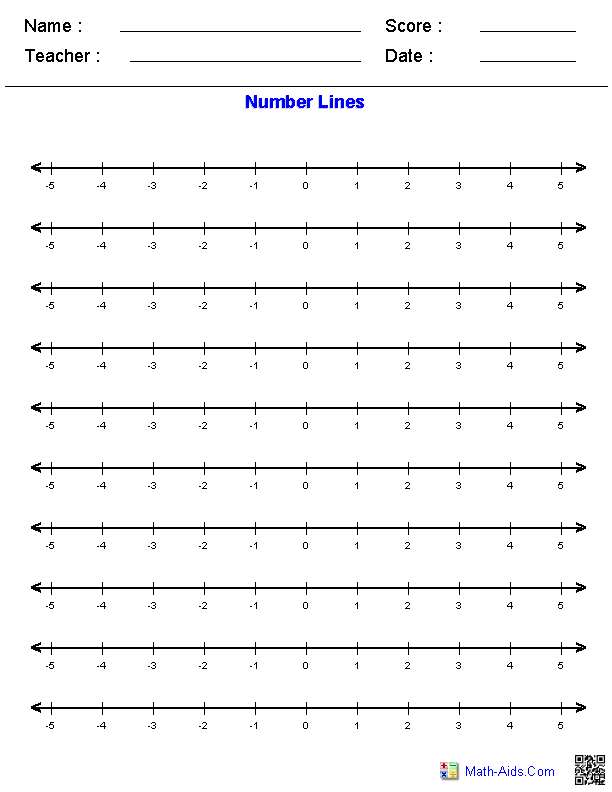
Great Site for Making Number lines

A great resource for using number lines to help support common core math standards.

A great number line is hard to find. Now there is a site where you can custom make number lines to suit your needs for free.

At math-aids.com there are many options to choose from.

1) You can generate blank number lines. Your options include positive or negative numbers, and different ways to break up the number line into whole numbers or fractions.

2) You can create worksheets to add or subtract numbers on a number line.

3)You can create worksheets to locate fractions, mixed numbers, or decimals on a number line. This also includes positive or negative numbers.

http://www.math-aids.com/Number_Lines/

Number Lines Graphing Paper

Friday, August 24, 2012

Thinking Blocks.Com

http://www.thinkingblocks.com/

Model and Solve Math Word Problems
Thinking Blocks is a suite of learning tools designed to help students solve math word problems accurately and efficiently. Using brightly colored blocks, students model mathematical relationships and identify known and unknown quantities. The model provides students with a powerful image that organizes information and simplifies the problem solving process. By modeling increasingly complex word problems, students develop strong reasoning skills which will facilitate the transition from arithmetic to algebra.

Tuesday, August 7, 2012

yummymath.com


Quoted from the site
"We’ve created Yummy Math to provide teachers with an easy way to bring real-life into their math classrooms. It is our belief that when math is explored in contexts that are familiar and of interest to students, students will be more engaged to do math, reason, think critically, question and communicate.  Our activities are written to correspond with the NCTM Process Standards and the CCSS Standards for Mathematical Practice.  We are in the process of adding CCSS correlation to each of our activities.  We’ve kept the site updated with multiple activities per week since March 2010 at no charge to teachers. If you have used our material, please consider making a donation to help us continue bringing meaningful mathematics to you and your students. Thank you."

Friday, August 3, 2012

Mathsnacks.com

http://mathsnacks.com/

What are math snacks?
Math Snacks are short animations and mini-games designed to present mathematics in a very different way. In fact, we hope these snacks don't look like traditional math at all. Math Snacks give students, especially those who don't particularly like math, another way to look at math concepts. 

Each Math Snack has a learner guide that kids can use to transfer a conceptual understanding to math problem solving. Teacher guides and printed transcripts of each animation are also available.

Friday, July 27, 2012

Mastery Connect For Common Core State Standards

 join FREE
www.masteryconnect.com/
 
Mastery Connect is a new website that allows teachers from all over the country to collaborate. You can sign up for free. Then you can browse assessments that other teachers have uploaded. The search feature allows you to easily select common core state standards. Then you can bookmark, save to your own computer, print and more. When you are ready to create your own it is very easy to mark the CCSS.

I checked this out and it looks neat. Of course the really cool features cost money, but they do give you a lot for free.
 

Thursday, July 26, 2012

Free Long Range Planning Guide 2012 to 2013 School Year


___________________________________________________________________________

 I use this planning guide to map out my curriculum for the whole year. It is divided so that every page has two months.

I marked this document with my school's days off. This is a word document so you can quickly make changes to make this work for you.


Thanks,
Simone

Saturday, May 12, 2012

Free Tools For Educators

The Dice Maker :Generate printable dice with images or text on each face of the dice. You can print one or two dice at a time and even mix and match text and images. These are great for foreign language teachers.


Printable Board Games: Make board games with images, images mixed with text, or all text. Use the all text version to create printable math board games. There are currently games for over twenty themes but more to come! Two styles and 4 themes to choose from:


Domino Maker: You can make dominoes with text on the left and images on the right. You can print up to 10 per page.  Many different vocabulary categories to choose from and eventually over 1500 words that match the vocabulary from MES English.


Others: Word search, crossword, bingo, maze, and more 

Get all of these and more at  http://www.toolsforeducators.com/

Sunday, January 29, 2012

Pearson CCSS Database


 This is a great tool. Now you can quickly search the CCSS database to see if they learned a concept in previous years.

 You can search their database three ways.
  • Select a key concept such as rounding decimals. Then it will show you all of the grades that have standards relating to it.
  • Select a grade and all of the standards will show up.
  • Select a  a grade to see all of the key concepts taught.